Changelog

Every version, what changed and why. Same content as the What's new card in the Mac app.

tidy does more on its own and gets in your way less.

  • Just ask, and tidy changes settings
  • Questions don't cover what you read
  • tidy cleans up finished Tasks for you
  • tidy speaks the language you choose
  • Drag a Task into the composer
  • Hover a Task row to see where it stands

NewJust ask, and tidy changes the setting

Before

New features often came with "turn on this setting", and finding that setting was a chore. tidy understands what you say, so it should change the setting for you too. We had put this off for a long time.

What changed

Say what you want, or ask "can you do this?". If a setting makes it possible, tidy changes it right away. The changed setting shows up in the chat as a switch, so you can flip it yourself. Settings that reach outside or widen permissions, like turning notifications on or turning off the check before sending, tidy never changes for you. Flip that switch yourself.
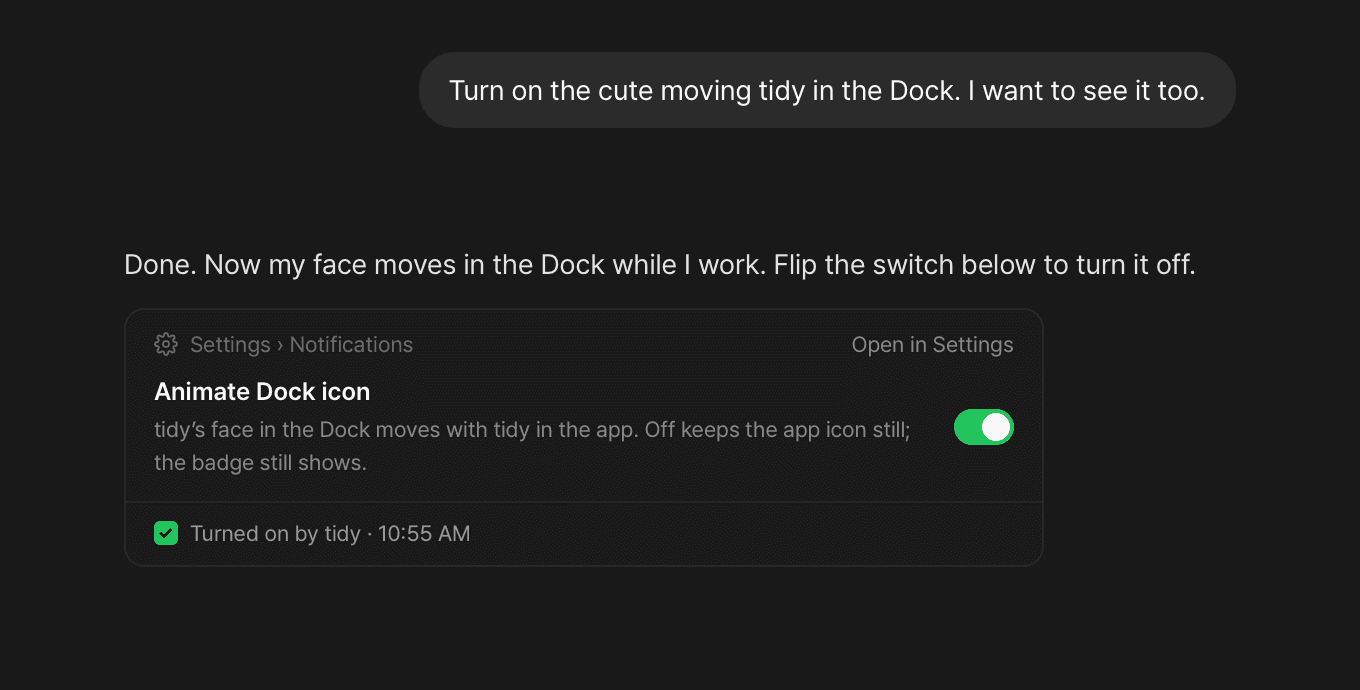
Asking tidy to animate the Dock icon turns on the Animate Dock icon switch right in the chat

Try saying“Turn on the animated Dock icon”
NewQuestions don't cover what you're reading anymore

Before

When tidy asked something, a question card rose from the bottom and covered what you were reading. A chat reads top to bottom, and covering the spot you were reading with the newest question felt wrong.

What changed

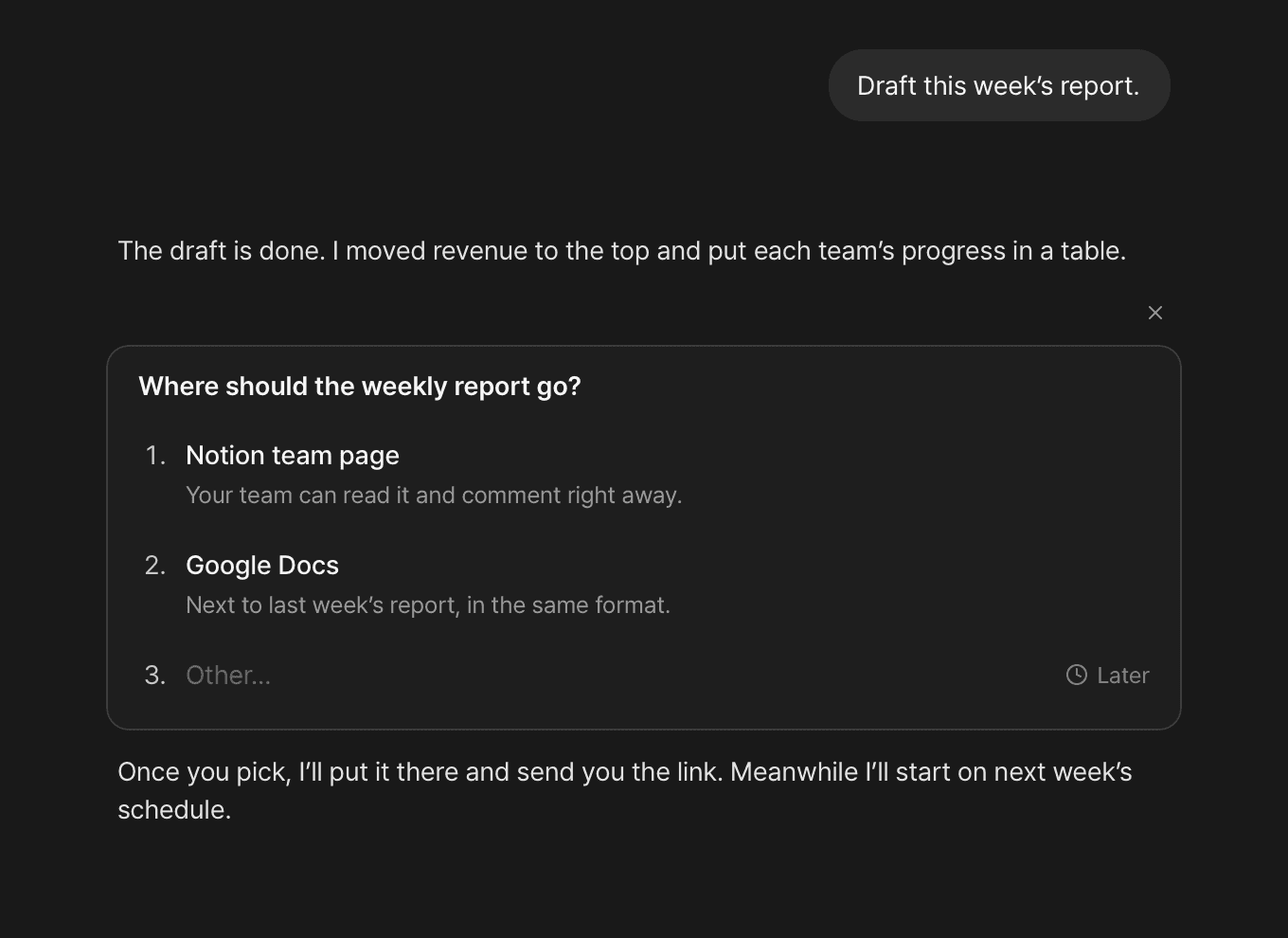
The question card is gone. The question now sits inside tidy's answer, so you meet it as you read down and pick right there.

A question and its numbered choices sitting inside tidy's answer, in the flow of the chat

Newtidy cleans up its own Tasks

Before

tidy promised to keep things clean, yet it left Tasks lying around while it worked. It often made several Tasks for one job and finished only one, leaving the rest behind. With a name like tidy, it should clean up what it made.

What changed

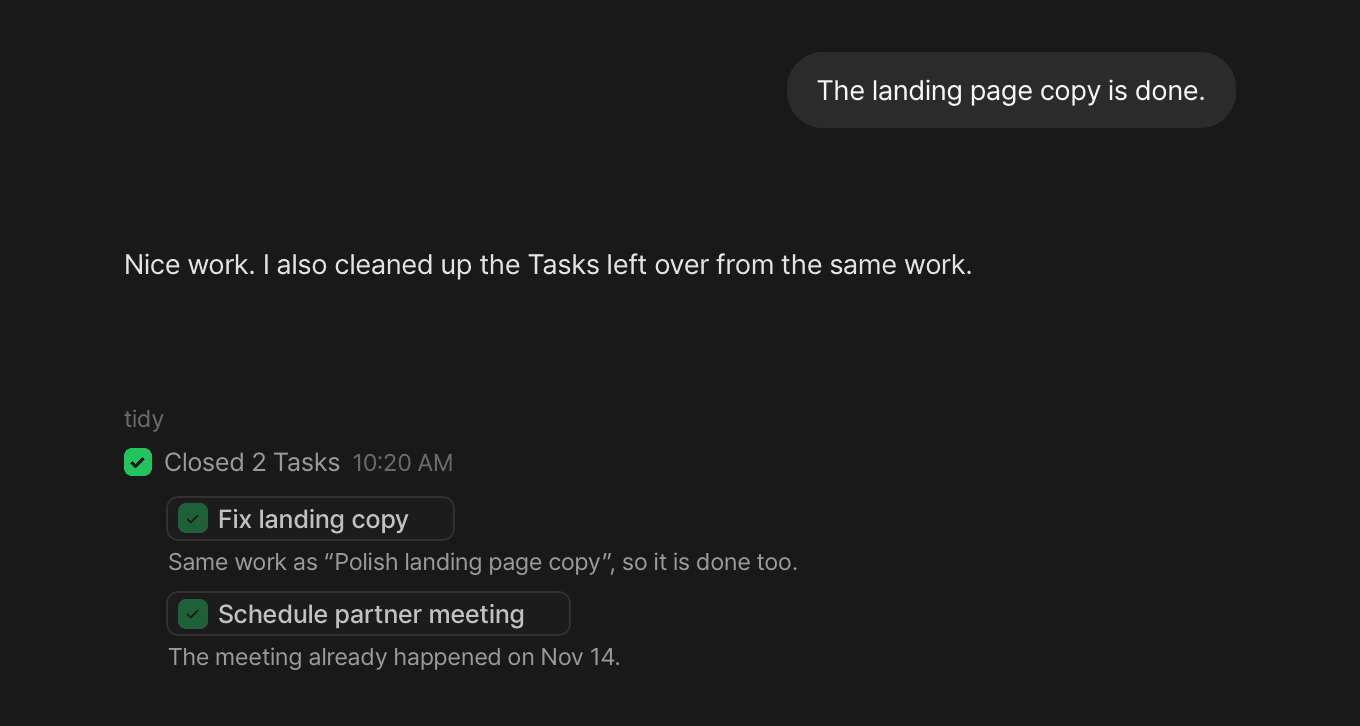
Before making a Task, tidy checks whether the same work already exists. When it finishes work, it closes the Tasks that finished with it. Once a day, like cleaning a room, it looks over Tasks that have stood still for long, and closes the clear ones with a reason. It asks only about the unclear ones. A closed Task stays in the tidy chat, and checking it again brings it right back.

After you say the work is done, tidy's 'Closed 2 Tasks' line shows the leftover Tasks it closed

Also new

Newtidy speaks the language you choose

Before: tidy quietly switched language based on what you wrote, so it sometimes answered in a language you did not want.

Now: It speaks only the language you pick in Settings › General › Language. When you start, it asks which language to continue in. Changing the language goes through a confirm sheet and applies to the tidy that is running right now (Task leads from their next start). Ask for another language in the moment and only that text is written in it.

NewDrag a Task into the composer

Before: To tell tidy or a Task lead which Task you meant, you had to retype its title.

Now: Drag a Task row from the right onto the center and it attaches to the composer as a Task chip; the Task goes along when you send. You can drop anywhere in the center. Reordering inside the right list works as before.

NewHover a Task row to see where it stands

Before: A Task kept running, and you could not tell why or what it was doing.

Now: Hover a row and a card shows subtask progress (up to 5), background jobs it waits on, and its last answer. The "Waiting on … · 12m" line at the end of a chat shows what it waits for; click it for the job list and Stop. ↗ Open session takes you straight in, and Poke moved to Ask for an update in the ⋮ menu.

NewChoose how your words are handled while tidy works

Before: When you sent something while tidy or a Task lead was working, you could not choose how it would be read.

Now: In Settings › Agents › Chat › Follow-up behavior, pick Queue (default) or Steer. Queue waits in order; Steer stops the running turn and reads your words right away. With an empty composer, ⌘↵ sends the first waiting message now.

NewSlack attachments, previews and thread replies are fixed

Before: Slack attachments would not open ("Load failed"), the list preview showed a thread reply so you could not tell which conversation it was, and replying to a thread comment went out as a new channel post.

Now: Attachments open, the preview shows the last original post, and a reply to a thread comment goes to that thread.

The rest15 items · ExpandCollapse
  • tidy is lighter on your computer

    Before: While tidy wrote an answer, or after you reopened the app, tidy used a lot of your computer, so the app lagged and words you cut in came in late.

    Now: While it writes, the screen redraws only as much as needed, and past chats are not reread. Long chats run light.

  • Answering questions feels smoother

    Before: Answering in one place closed the same question elsewhere 1–2 seconds late. Answering one of several questions on the right closed the group and reopened it, and pressing Other… in a question block shrank it or made it jump while typing.

    Now: The center, the left To decide and the right Task row close together at once, and the block stays put when you press Other….

  • Several questions at once no longer vanish

    Before: When a Task lead asked 2 or 3 questions at once, only the first stayed and the rest quietly vanished.

    Now: Every question stays on its own, and you answer them one by one.

  • Go back to an earlier tidy conversation

    Before: After restarting tidy, it was hard to pick up an earlier conversation.

    Now: In the tidy ••• menu › Resume conversation, pick one of the 6 most recent (Show all… for the rest) and tidy restarts on it.

  • tidy looks into To decide items more carefully

    Before: When making an item, tidy could not look at your calendar or other chats, so its judgment was shallow.

    Now: It finds and reads your calendar, chat search and reading, and Tasks on its own before laying out the item.

  • tidy can add and remove event guests

    Before: To add or remove people on an event you had to edit it yourself.

    Now: Ask tidy and it adds or removes guests. Whether to notify them is the same Send / Don't send choice as on screen.

  • Task titles follow what is left

    Before: Even when the work changed, a Task title stayed as it began, so you could not tell what was left.

    Now: When the purpose, due date or remaining work changes, tidy and Task leads fix the title too.

  • Expanded Task rows are tidier

    Before: Expanding a Task row with nothing to show gave an empty "No subtasks" line.

    Now: A row with nothing to show does not expand, and a Task someone worked on does not show "No one is on this yet".

  • A Task you answered does not hide

    Before: When you answered a question in Needs you, the Task moved into a collapsed group and seemed to disappear.

    Now: The group it moved to opens, so you still see it.

  • The send-confirm sheet matches the real room

    Before: The profile picture and the place of your message in the check before sending differed from the real room, which felt strange.

    Now: It looks the same as the real room.

  • Kakao join and leave notices no longer raise unread

    Before: System notices like someone joining or leaving a Kakao room moved the Inbox up and turned on unread.

    Now: Those notices do not affect Inbox order or unread.

  • tidy knows when a message arrived

    Before: tidy did not know when your words came in, so "a while ago" and "yesterday" got mixed up.

    Now: It knows the time each message was sent, and remembers it as the chat grows.

  • Dictation takes less disk

    Before: Dictation conversion files piled up and took more than several GB of disk.

    Now: They live inside app data, and unused ones are removed when the app starts.

  • See the update right in the app

    Before: After an update, you could not tell what changed inside the app.

    Now: Press What's new on the card at the bottom right after an update, and the changes open inside the card. Tell tidy anything you want done as you read, and ask "explain this update for me" to hear it fitted to how you use the app.

All versions